Stop flying blind
with AI code tools

Mistline sits beside your IDE and shows you exactly what AI coding tools are creating, changing, and breaking. In real time.

Get Mistline — $19 Launch price macOS · One-time purchase · Regular $29
Mistline
📁 src
Layout.svelte
App.svelte
main.ts
style.css
unused.ts
📁 lib
config.json
Layout.svelte
<script lang="ts">   import { onMount } from 'svelte';   let panels = 3; </script> <div class="layout">   ...
Activity
created App.svelte
modified Layout.svelte
created config.json
modified style.css

AI coding tools are powerful.
But they don't show you what they're doing.

You ask Claude Code to build a feature. It creates 12 files, modifies 5 more, and leaves behind 3 that nothing references. Your terminal scrolls past it. Your IDE sidebar can't keep up. You're left wondering: what just happened?

100% local. Zero data leaves your Mac.

No accounts. No telemetry. No cloud. No network requests. Your files, your data, your business. Nothing phones home, ever.

Everything you need to stay aware

Mistline sits alongside your IDE as an always-on companion. Not a replacement.
Visual file tree

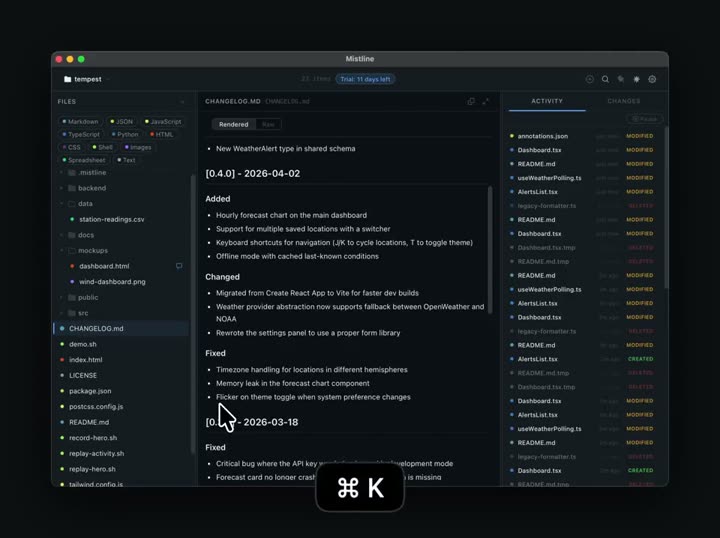
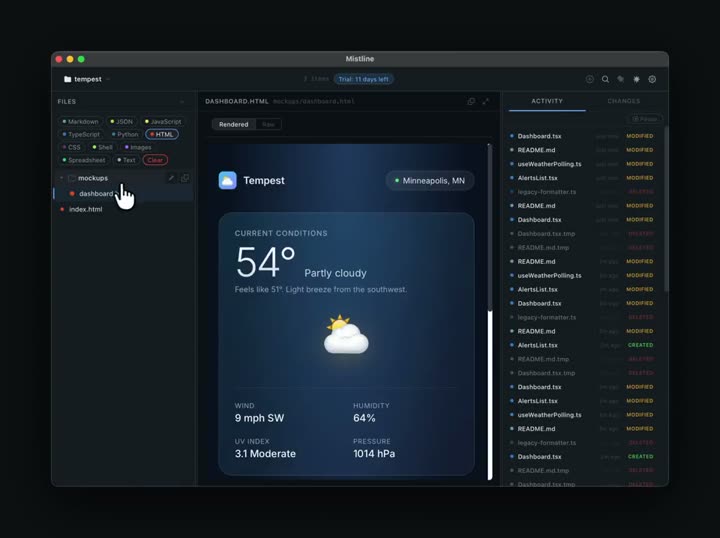
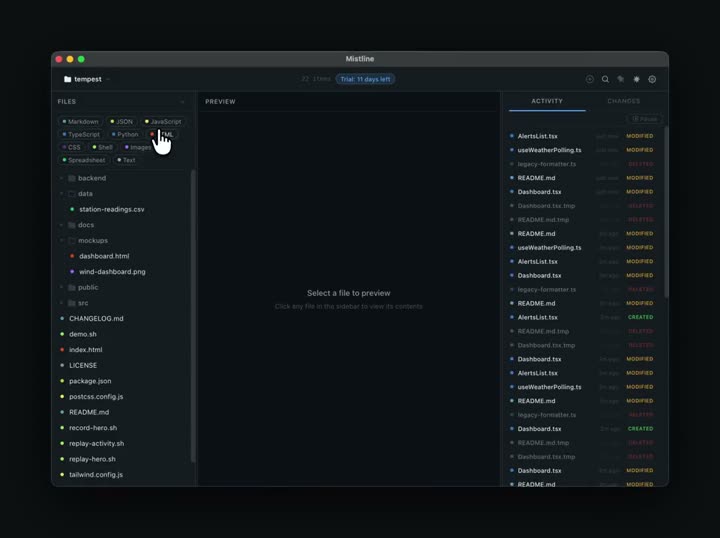
Color-coded by file type with real-time updates as AI tools create and modify files. Collapse, filter, search. All instant.
Live activity feed

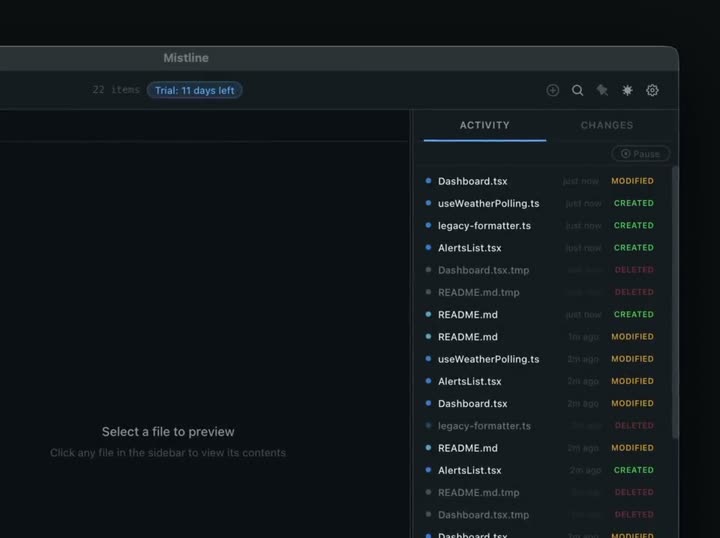
See every file create, modify, and delete as it happens. No more guessing what your AI tool just changed.
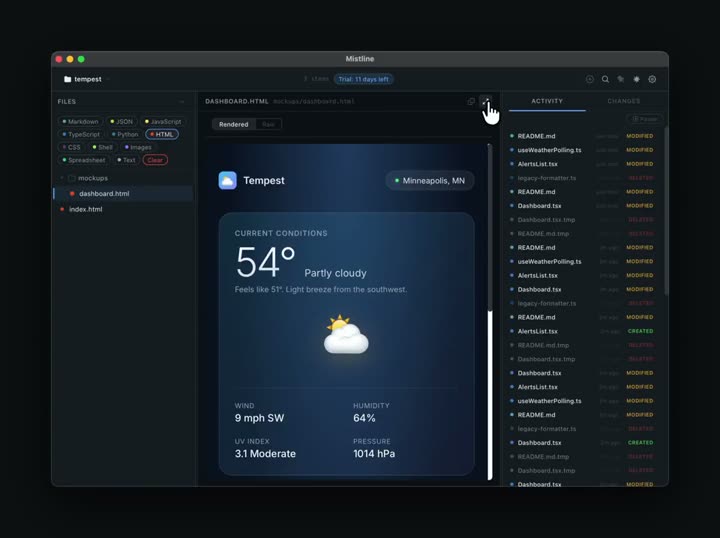
Instant file preview

Click any file to preview it. Markdown, HTML with full CSS, images, PDFs, CSVs with resizable columns. No IDE needed.

Search files & content

Cmd+K to search filenames and folders, or search inside file contents. Results reveal in the tree with a smooth highlight.

AI scope visualization

Toggle to see which files your AI tools can and can't see. Parses .gitignore, .claudeignore, .cursorignore, and .aiderignore.

Ghost file detection

Automatically flags duplicate filenames and orphaned files that nothing references. AI tools leave these behind constantly.

File annotations

Add notes to any file or folder. Remind yourself what something does, flag things to revisit, leave context for later.

Git changelog

Browse recent commits with expandable diffs. Green for additions, red for deletions. See what changed without leaving Mistline.

Search your project from anywhere

Press a global hotkey from any app and Mistline's command palette appears instantly. Search files, search content, then act.

Enter Open in Mistline
Cmd+Enter Open in editor
Cmd+Shift+Enter Reveal in Finder
Cmd+C Copy path
Layout.svelte src/lib/components
layout.css src/styles
layout.config.js config

Plus everything you'd expect

Pin to foreground
Dark & light themes
Custom shortcuts
One-click path copy
Open in editor
Reveal in Finder
Resizable panels
Focus mode
Persistent settings
Recent projects
Dotfile toggle
Native & fast

Built for the AI coding era

Whether you're a developer using Claude Code and Cursor to move faster, or building your first app with AI, Mistline gives you the visual awareness that terminals and IDEs don't.

Built with Rust. Runs natively on macOS. No Electron, no Chrome, no bloat.

Claude Code Cursor Codex Aider Windsurf

Frequently asked questions

Mistline is a native macOS app that gives you real-time visual awareness of your file system while you use AI coding tools. Think of it as a file companion that sits beside your IDE, showing you what's being created, changed, and left behind.

Any tool that creates or modifies files on your Mac. Claude Code, Cursor, Codex, Aider, Windsurf, Copilot, or any CLI/IDE that touches your file system. Mistline watches the files, not the tool.

Yes. Mistline is 100% local. No network requests, no accounts, no analytics, no telemetry. Everything runs on your machine and stays there. See our privacy policy for details.

macOS only right now. Windows and Linux support is planned for a future release.

The price goes up to $29. If you buy during the launch window, you keep the $19 price forever. No catch, no recurring charges.

Yes. 14-day refund policy, no questions asked. Email hello@mistline.app with your order details.

Simple pricing. No subscription.

Pay once, use forever. Free updates for the current major version.

Launch price · 2 weeks only
Mistline
$19
$29 regular price One-time purchase
  • Full app, all features included
  • macOS (Apple Silicon & Intel)
  • Free updates for v1.x
  • Optional $19/yr update pass for major versions
Get Mistline

Stay in the loop

Get notified when Mistline launches. No spam, just the announcement.